
Oluşturulan forum yanıtları
-
YazarYazılar
-

Merhaba,
Gerçekten emek isteyen bir çalışma gerçekleştirdiginiz için teşekkür ederim.Allah Rasulü Hazret-i Muhammed (Sallallahu Aleyhi ve Sellem) buyurdular ki :
Kim, (din) kardeşinin ırz ve namusunu onu gıybet edene karşı savunursa, Allah da kıyamet günü o kimseyi cehennemden korur.Tirmizi, Birr 20Allah Rasulü Hazret-i Muhammed (Sallallahu Aleyhi ve Sellem) buyurdular ki :
Bereket, büyüklerinizle birlikteliktir.Hâkim, el- MüstedrekOcak 23, 2007: 12:58 pm şuna cevap olarak: Exchange Server larınızın Üzerindeki İş Yükünü Paylaştırın (Network Load Balancing) #1424341Windows Sunucularla Ağ Yükü Dengeleme
Ağ Yük Dengelemesi (Network Load Balancing – NLB) üyeler arasında IP trafiğini bölüştürerek, her üyesine tek başlarına bulundukları durumdan daha az ağ yükü binmesini sağlayan bir teknolojidir. Büyük ağ yapılarında Web sunucularının performansı düştüğünde, "proxy" sunucusu isteklere yeterince hızlı cevap veremediğinde, terminal servisi sunucusu istemci yoğunluğundan yavaşlamaya başladığında NLB yapma gereği doğar. NLB birkaç sunucuyu bir araya getirip bunlardan bir NLB kümesi (cluster) oluşturur. Küme, ortak uygulamaları birlikte çalıştırıp, uygulamaya ya da istemciye tek bir sistem imajı üreten bilgisayar grubudur. Bilgisayarlar birbirine donanımsal ve yazılımsal olarak bağlıdır. Bu bağlantılar bilgisayarlara hata toleransı ve ağ yük paylaşımı olanağı sağlar.Yük dengeleme çözümleri 4 ana kategoride toplanır;
Round Robin DNS: DNS tabanlı bu çözüm kısıtlı ve statik bir yük dağılımı sağlar. Örneğin, itu.edu.tr etki alanı altında bulunan 'www' kaydı için DNS'de aşağıdaki gibi 3 farklı A kaydı oluşturulmuş olsun:
www 160.75.2.10 www 160.75.2.11 www 160.75.2.12
DNS sunucu kendisine http://www.itu.edu.tr ismini çözmek için yollanan sorgulardan ilkine cevap olarak sırasıyla 160.75.2.10, 160.75.2.11 ve 160.75.2.12 ‘yi yollar ve bu cevabı alan istemci ilk olarak 160.75.2.10 IP adresine bağlanır. Bir sonraki sorgu için DNS sunucu 160.75.2.11, 160.75.2.12 ve 160.75.2.10 cevabını yollar ve bu cevabı alan istemci ilk olarak 192.168.1.11 IP adresine sahip Web sunucusuna bağlanmaya çalışır. Bu yapı her ne kadar Web sunucuları arasında yük dağılımını sağlayan bir yapı olarak görülse bile aslında tam manasıyla Web sunucuları arasında bir yük dağılımı sağlamaz; çünkü 192.168.1.10 IP adresine bağlanan bir istemcinin bu Web sunucusuna yollayacağı istek sayısı ile 192.168.1.11 IP adresine sahip Web sunucusuna bağlanan istemcinin bu Web sunucusuna yollayacağı istek sayısı birbirinden farklı olabilir. Ayrıca DNS’e girilen ve istemcilere cevap olarak yollanan IP adreslerinden herhangi birisine sahip bir Web sunucusunun hizmet veremediği bir durumunda kendisine cevap olarak dönen listedeki sıralamanın başında çöken Web sunucusunun IP adresinin bulunduğu bir istemci belirli bir süre hizmet alamayacaktır. İstemcilerin hizmet veremeyen bir Web Server’a bağlantı isteği yollamalarını önlemek için DNS’teki bu A kaydını silmek gerekecektir. Bu durum da "Round Robin DNS" yapısının statik olduğunu gösterir.
Hardware-Based Load Balancing (Donanım Bazlı Ağ Yükü Dengeleme): Belli donanımlar kullanılarak gerçekleştirilen çözümdür. Bu yapıda kümenin IP adresi donanıma atanır ve donanım kendisine gelen istekleri tipik bir NAT (Network Adress Translation – Ağ Adres Çevrimi) işleminden geçirerek kendisine bağlı sunuculara kendi üzerinde tanımlı kurallar çerçevesinde iletir.
Dispatcher Software Load Balancing (Yazılım Bazlı Ağ Yükü Dengeleme): Bu yapı, yukarıda anlatılan "Hardware-Based Load Balancing" ile çok benzerdir. Tek farkı yük dağılımı için bir donanım değil de bir yazılım kullanılmasıdır. Bu yapıda yük dağılım işleminin performansı, yazılımın çalıştığı bilgisayarın performansıyla doğru orantılıdır.
Network Load Balancing (Ağ Yükü Dengeleme): Yazılım temelli bu çözüm herhangi bir donanıma ya da üçüncü parti bir yazılıma ihtiyaç duymadan çalıştırılabilir. Bu dökümanda bu yapı üzerinde durulacaktır.
Ağ Yükü Dengeleme (Network Load Balancing – NLB); Windows 2000 ve 2003 Server ailesi işletim sistemlerinin bir parçası olarak Microsoft’un sağladığı bir teknolojidir.
Windows Server ailesindeki Network Load Balancing servisini kullanarak kümeleme (clustering) sayesinde herhangi bir ağdaki Web sunucusu, FTP sunucusu, firewall sunucusu, proxy sunucusu, VPN sunucusu, media sunucusu, terminal sunucusu gibi sunucuların istemcilere kesintisiz ve kabul edilebilir bir kalitede hizmet vermesini sağlanabilir.NLB özelliğini destekleyen Windows Server versiyonları:
• Windows 2000 Advanced Server
• Windows 2000 Datacenter Server
• Windows Server 2003 Web Edition
• Windows Server 2003 Server Edition
• Windows Server 2003 Enterprise Edition
• Windows Server 2003 Datacenter Edition
Temel olarak, NLB açıldığında, NLB sürücüsü NIC sürücüsü ile IP protokolü arasına yerleşir ve tüm NLB kümesi üyelerine gelen her paketi alıp inceler. Paket kablodan kümeye geldiğinde her nod paketi alır, inceler ve küme çapında belirtilmiş kurallara göre paketi üst katmanda bulunan IP protokolüne iletir veya paket daha NLB sürücüsündeyken dışarı atılır. Böylece trafik nodlar arasında paylaştırılır. Kısaca tüm nodlar kümeye gelen trafiği alır; ama bazıları cevap verir.NLB kümeleri iki farklı modda çalışabilir. Birincisi, aynı zamanda varsayılan mod olan "unicast mod"’dur. "Unicast mod"'da kümeyi oluşturan nodlarca kullanılan bir tek sanal MAC adresi vardır. Bu adres daima 02-BF ile başlar. Tüm küme üyelerinin bu tek adresi kullanması, onların bu adresi kullanan (NLB sürücüsü çalışan) ağ kartı üzerinden görüşebilmelerini engeller. Örneğin; nod A, nod B’ye bir paket gönderirken hedef ve kaynak MAC adreslerini aynı yazar. Bu paketi alan nod B kaynak MAC adresi ile paketin hedefi olan kendi MAC adresini karşılaştırınca bunların aynı olduğunu görüp bir hata oluştuğunu düşünerek paketi atar. Sonuç olarak "unicast mod" çalışan bir NLB kümesi üyeleri NLB çalıştıran ağ kartı üzerinden birbirleriyle görüşemezler. Bu sorunu ortadan kaldırmak için iki yöntem vardır. Birincisi nodlara ikinci bir ağ kartı takmaktır. İkinci ağ kartı, NLB kümesi ile aynı ağa veya farklı ağa bağlı olabilir. Nodlar arasında ilave bir bağlantı sağlaması yeterlidir. İkinci çözüm ise ikinci NLB küme modu olan "multicast mod"'u kullanmaktır. "Multicast mod"'da NLB küme üyeleri hem sanal MAC adresini hem de kendi MAC adreslerini kullanırlar. Bu modda paylaşılan MAC adresi (sanal MAC) daima 03-BF ile başlar. Üyeler bu modda NLB kurulu ve çalışan ağ kartı üzerinden birbirleri ile görüşebilirler. Bu küme üyelerinde tek ağ kartı olduğu durumlarda tavsiye edilen küme modudur.
NLB küme üyelerinin birbirleri ile sürekli haberleşmek zorundadır. Yakınsama (Convergence), NLB küme durumunun belirlenmesi ve yükün dağıtılması sürecidir. Kısacası NLB algoritması nod sayısı, varsa belirlenen port kuralları ve küme IP’lerini göz önüne alarak bir hesap yapar, bu hesap sonucuna göre üyelerin küme IP’sine gelen trafiği kabul ya da reddetmesini sağlar.
NLB küme üyeleri için yakınsama süresi 3 saniyedir. Yani bir NLB küme üyeleri devre dışı kaldığında, diğer üyelerin bunu farkettikten sonra tekrar yük dağılımını düzenlemesi 3 saniye sürer. Örneğin, üç üyeli bir NLB kümesine gelen trafik 33% olarak paylaştırılırken, bir nod devre dışı kalınca 3 saniyede yakınsanmış olur ve trafiği 50% olarak paylaştırmaya başlar.
NLB ile ilgili diğer bir kavram “Heartbeat”dir. "Heartbeat" bir NLB üyesinin diğer üyelere devrede olduğunu söyleme sistemidir. Bu sayede birbirlerinin durumundan haberdar olurlar. NLB kümesine bir nod eklenince, bir nod devre dışı kalınca veya bir nod yeniden devreye girince bunu tesbit etmelerini sağlayan Heartbeat paketleridir. Heartbeat NLB çalışır durumdaki ağ kartı üzerinden yapılan bir broadcast'tir. Heartbeat NLB üyesinin üzerinde bulunan ilave ağ kartlarından yapılmaz. Her NLB küme üyesi 1,5 KB l'ik bu heartbeat mesajlarını saniyede bir kere gönderir. Bu gönderilme aralığı kayıt defterinden (registry) değiştirilebilir; fakat bu ayar tüm üyelerde aynı olmalıdır.
Varsayılan olarak bir nod arka arkaya 5 heartbeat kaçırırsa diğer NLB küme üyeleri o n**** kümeden düştüğüne karar verirler. Böylece yeni üye sayısı ile birlikte NLB algoritması yeniden çalışır, yakınsama başlar. Ne kadar heartbeat mesajı kaçtıktan sonra o nod devre dışı kabul edileceği de kayıt defterinde modifiye edilebilir (bu ayar da tüm üyelerde aynı olmalıdır).
Sonuç olarak, yeni bir nod eklenirse bunun tesbit edilip yükün tekrar dağıtılması 3 saniye sürer. Bir nod devre dışı kalırsa bunun diğer nodlarca farkedilmesi ve "convergence"’a başlanması için 5 saniye gereklidir (yani arka arkaya 5 heartbeat kaçırma). Convergence 3 saniye süreceği için yükün tekrar paylaştırılması toplam 8 saniye sürecektir.
NLB ile ilgili bir diğer önemli kavram ise "affinity" (eğilim) 'dir. Eğilim, NLB nin nasıl çalışacağıdır yani bir üye NLB kümesine gelen IP paketlerini kabul edilip edilmeyeceğini belirler. None, Single ve Class C olmak üzere 3 tip eğilim vardır. Affinity, None olarak ayarlanmışsa gelen paketler kaynak port ve kaynak IP bazında işlenir. Örneğin, Web sunucusu NLB kümesi oluşturmak isteniyorsa seçilecek olan eğilim bu olmalıdır. Böylece küme sanal IP adresine gelen trafik tüm üyelerce eşit şekilde paylaşılır. Bir istemci, örneğin bir Web sunucusu, NLB kümesinin sanal IP adresine geldiğinde küme üyelerinden biri tarafından kabul edilir. İstemci tekrar bağlandığında rasgele başka bir üye tarafından kabul edilir ve bağlantı kurulur.
Single Affinity ise kaynak IP adresine göre NLB kümesine gelen trafiği dağıtır. Örneğin, bir istemci iki terminal sunucudan oluşan bir NLB kümesinde sanal IP adresini yazarak bir terminal bağlantısı kurup, küme üyelerinden nod A tarafından kabul edildiğinde bu sunucu üzerinde kendisine ait oturumla çalışırken bağlantı kesilirse ve istemci tekrar bağlantı kurmak için NLB kümesine giderse NLB istemciyi belki nod B'ye yönlendirir. Bu durumda nod A'da bekleyen oturumuna (açık olan dokümanlar, programlar, vs.) ulaşamaz. Dolayısıyla istemcinin tekrar nod A'ya bağlanması için kullanılması gereken affinity Single’dır.
Son eğilim tipi olan Class C Affinity ise aslında Single Affinity benzeri bir NLB yöntemidir. Single Affinity'ye göre daha az kısıtlayıcıdır. Kısaca aynı C sınıfı aly ağdan gelen kullanıcılar hep aynı küme üyesi tarafından karşılanır. Fazla kullanışlı görünmemesine rağmen özellikler Proxy sunucuların yük paylaşımı için kullanılabilir.
Ağda yük paylaşımı yönetimi için temel olarak Network Load Balancing Manager snap-in’i kullanılır. Bununla birlikte ağ kartı özellikleri penceresinden de NLB ayarları yapılabilir. Yalnız NLB ayarları yapılırken Network Load Balancing Manager snap-in ve ağ kartı özelliklerinin birlikte kullanılması bazı tutarsız sonuçlara yol açabilir. Bunun dışında komut satırından NLB konfigürasyonu yapmak için wlbs ve nlb gibi araçlar da mevcuttur.Ağ Yük Dengeleme ayarları üç temel bölümden oluşur;
Cluster Parameters (Küme Parametreleri)
Host Parameters (Sunucu Parametreleri)
Port Rules (Port Kuralları)Bu ayarlardan Küme Parametreleri tüm NLB kümesi üyelerinde aynı olmalıdır. Cluster IP configuration kısmında NLB kümesine atanacak sanal IP adresi bunu alt ağ maskesi ile kümenin FQDN’i ve kümenin sanal MAC adresi ayarları bulunur.
Küme Operation Mod kısmında da küme çalışma mod’u ayarlanabilir. "Remote control" kısmında ise NLB kümesinin uzaktan yönetimine izin verilebilir ve bu uzaktan yönetim için şifre belirlenebilir.
Host Parameters sekmesinde küme üyelerinin herbiri için spesifik olan ayarlar yapılabilir. İlk değişken olan Priority 1-32 arası değerler alır ve Priority değeri 1 olan NLB kümesi üyesine "Default Host" denir. NLB kümesine bir "Port Rule" tarafından belirlenmemiş bir trafik ulaşırsa bunun kimin tarafından işleneceğini belirleyen bir değerdir. Aslında varsayılan olarak tüm portları kapsayan bir kural olduğu için Priority’nin değeri bu Port Rule silinmeden bir anlam taşımaz. Dedicated IP kısmında sadece o küme üyesine ait olacak ve ona ulaşılırken kullanılabilecek bir IP adresi belirtilebilir.Host Parameters kısmındaki bir diğer ayar olan Initial Host State ise küme üyesi olan makina tekrar başladıktan sonra NLB servisinin durumunun ne olacağını belirtir. Varsayılan değer olan “Started” makina açıldığına NLB servisinin tekrar çalışmasını ve bu üyenin tekrar NLB kümesine dahil olmasını sağlar.
NLB ayarları içinde belki de en önemlisi olan "Port Rule", port kurallarının yapıldığı bölümdür. Daha önce bahsedilen "affinity" ayarlarının yapıldığı yer de burasıdır.
"Port Rule", tüm port ve protokolleri içeren, bu trafik için "Single Affinity" uygulayan ve bunu da eşit bir şekilde tüm küme üyelerine dağıtan bir kuraldır. Kural içeriğini görmek için kural seçiliyken "Düzenle" seçmek yeterlidir.
Buradaki ayarlardan ilki olan Küme "IP address", NLB kümesinin hangi IP'leri için kuralın geçerli olacağını belirler. Bunun altındaki "Port Range" kuralın hangi portları içeren bir kural olacağını ayarlar. "Protocols" ise hangi protokollerle gelen trafiğin NLB sürecine dahil edileceğini ayarlar.
"Filtering Mod" kısaca yük dengeleme trafiğinin birkaç üye arasında dağıtılıp dağıtılmayacağını ve bu dağılımın (Affinity) nasıl yapılacağını belirler. Üç Affinity tipi de burada görülmektedir. Yük üyeler arasında eşit dağıtılabileceği gibi oranlı bir şekilde de dağıtılabilir. Bunu için Equal seçeneği kaldırılmalı ve üyeler arasında toplam 100 olacak şekilde istenilen değerler verilmelidir. Filtering Mod kısmındaki bir diğer seçenek olan, "Single Host" ise kümeye gelen trafiği tek bir küme üyesinin karşılaması prensibiyle çalışır. Burada ayırıcı olan kriter Handling Priority’dir. Handling Priority değeri düşük olan NLB kümesi üyesi bu kural tarafından belirtilen trafiğin tek hedefidir. Bu üye devredışı kalırsa trafik bir diğer üyeye yönlendirilir.
Son ayar olan "Disable This Port Range" ise aslında TCP/IP filtering’den farksızdır. Kısaca kural tarafından belirlenen portları kapatır.
Özetle, Ağda Yük Paylaşımı sadece TCP ve UDP trafiğini desteklemez. GRE trafiği için de yük dengelemesi yapabilir. Bununla birlikte 2003 NLB servisi VPN bağlantısı için PPTP ile birlikte IPsec protokollerini de destekler. Yalnız kümeye yeni üye eklenmesi durumunda bazı istemci bağlantıları kesilebilir (Bu sorun XP SP1 ve 2003 için giderilmiştir). Son olarak, NLB ve Microsoft Server Clustering Services aynı makinaya kurulamazlar.Ocak 23, 2007: 12:57 pm şuna cevap olarak: Exchange Server larınızın Üzerindeki İş Yükünü Paylaştırın (Network Load Balancing) #1424340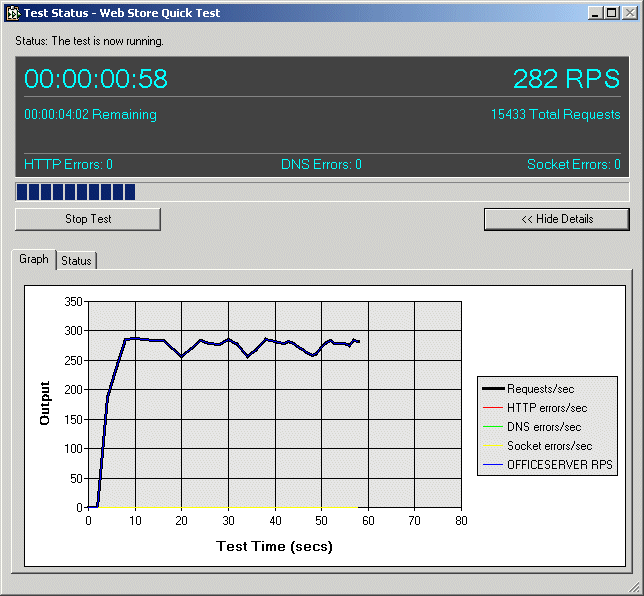
Figure 11 – Using Application Center Test to stress test a simple page. The result here is from
combined machines – which running around 275 rps. Machine 1 and 2 individually were running 136 and 158 rps respectively.The script hits only the ASPX page – no images or other static content was hit. I tested each of the machines individually changing the IP Addresses to their dedicated IPs in the ACT script first and then together by changing the script to use the virtual IP. The results for this short 5 minute test are as follows:
Web Store Single Read Page TestTest ModeRequests per secondOffice Server 111.111.111.2
162Laptop 111.111.111.1
141Both of them Load Balanced 111.111.111.10
276This is a ratio of 91% for the load balanced vs. the machines individually which is excellent given that we are running with a single adapter here.
The second test is a bit more realistic in that it runs through the entire Web Store application site and uses a shared SQL Server on a third machine.
Web Store Full Order TestTest ModeRequests per secondOffice Server 111.111.111.2
91Laptop 111.111.111.1
85Both of them Load Balanced 111.111.111.10
135Here the ratio is a bit worse: 77%, but the reason for this drop off has little to do with the Load Balancing, but the fact that there are some limits being hit on the SQL Server. Looking at the lock count with performance monitor reveals that the site is hitting the SQL box pretty heavily and the locking thresholds are causing requests to start slowing down significantly.
This application is not heavily SQL optimized and performance could be improved to make these numbers higher both for individual and combined tests. However, this test shows that load balancing can help performance of an app, but that there may still be other limits that can slow down the application as a whole. In short, beware of load issues beyond the Web front ends that can bite you in terms of performance. Still even in this test where an external limit was being approached we still got a significant gain from using Load Balancing.
Port Rules revisited: SSLRemember I configured my server for HTTPS operation by configuring port 443 earlier? Actually only one of the servers has the certificate installed, so I need to manage the port rules to drive all HTTPS traffic to the SSL enabled server. This must be administered manually through the Network Connections dialog by clicking on the Load Balancing Service and then configuring the Port Rules. Notice that this dialog shown in Figure 12 has a Load Weight option, which is set to 100 in the SSL enabled server and 0 in the other.
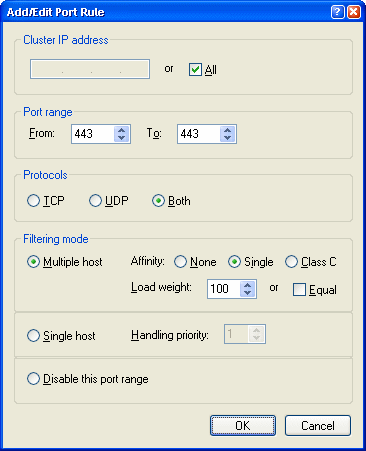
Figure 12 – When editing the Port Rules in Network Connections
you can configure the load weight for each server in percentages.This effectively drives all SSL traffic to the machine that has the certificate installed.
Load Balancing and your Web applicationsRunning an application on more than one machine introduces potential challenges into the design and layout of the application. If you're Web app is not 100% stateless you will run into potential problems with resources required on specific machines. You'll want to think about this as you design your Web applications rather than retrofitting at the last minute.
If you're using Active Server Pages, you'll have to know that ASP's useful Session and Application objects will not work across multiple machines. This means you either have to run the cluster with Single Affinity to keep clients coming back to the same machine, or you have to come up with a different session management scheme that stores session data in a more central data store such as a database.
Thankfully ASP.Net has several ways around this problem by providing different options for storing Session state using either a separate State Service that can be accessed across machines or by using Session state stored in a SQL Server database. You should always use session state in one of these mechanisms because these mechanisms can survive Web application restarts which can happen more frequently in ASP.Net due to changes in web.config or simply from the Web Server (IIS 6) recycling an Application Pool.
Finally, load balancing can allow you to scale applications with multiple machines relatively easily. To add more load handling capabilities just add more machines. But remember that when you build applications this way that your weakest link can bring down the entire load balancing scheme. If your SQL backend which all of your cluster nodes are accessing is maxed out, no amount of additional machines in the load balancing cluster will improve performance. The SQL backend is your weakest link and the only way to wring better performance out of it is to upgrade hardware or start splitting databases into separate servers.
Pulling the plugAs mentioned earlier redundancy is one of the goals of a load balanced installation and to test this out I decided to test a failure scenario by pulling the network cable out of one of my servers. With both cluster nodes running one of the clusters went dead and after 10 seconds all requests ended up going to the still active cluster providing the anticipated redundancy. A few requests on the client ended up failing – basically those that had made it into the servers request queue. All others are silently moved over to the other server in the pool.
In another test I decided to turn off the Web service, which resulted expectedly in the network connection still being fed requests that now started to fail. This is to be expected because NLB deals at the network protocol level but doesn’t check for failure of the requests at the network application level (Web Server). For this scenario you will need a smart monitoring application that can tell that your Web services are not responding on port 80 or even better not returning the results that you should be getting back.
The bottom line here is: The service works well for catching fatal failures such as hardware crashes or network failures that cause the network connection to a single machine to die. But application level failures continue to be your responsibility to monitor and respond to.
Just add water… eh, machines
The Windows Server Network Load Balancing service finally makes load balancing affordable and relatively easy to implement. It’s taken a while to get here from two Windows versions back, but now that the tools are integrated into Windows it’s relatively painless to scale out to other machines. It’s good to know that the capabilities are built-in and that you can tackle applications that may require more than a single machine.
Just remember to plan ahead. Just like anything the process of taking an application and making it do something new, spreading apps over multiple machine takes time and some planning to get right. Don’t wait until you really, really can’t live without this feature – start planning for it before you do. Finally make sure you know your bottlenecks in your Web applications. A load balancing cluster is only as good as its weakest link. Pay special attention to data access as that is likely to be the most critical non-cluster component that can potentially snag scalability.
But isn’t that a position we all wish we were in? So much traffic we can’t handle it? Well, hopefully you’ll get to try out this scenario for real – real soon, so you (or your boss) can retire rich…
As always if you have any questions or comments about this article please post a message on our message board at: http://www.west-wind.com/wwThreads/Default.asp?Forum=Code+Magazine.
Ocak 23, 2007: 12:56 pm şuna cevap olarak: Exchange Server larınızın Üzerindeki İş Yükünü Paylaştırın (Network Load Balancing) #1424339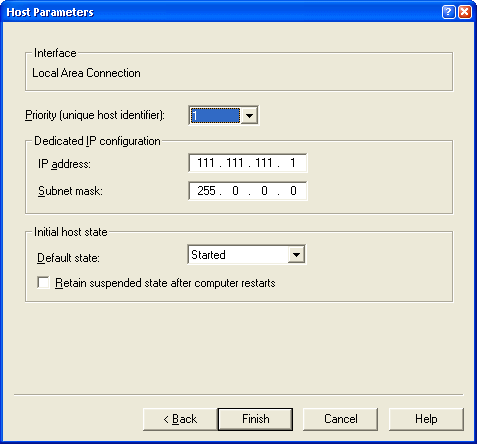
Figure 7 – Setting the node parameters involves setting a priority for
the machine, which is a unique ID you select. The lower the number
the higher the priority – this machine acts as the master host.Click finish and now we have one node in our cluster.
Actually, not quite so fast. Be patient, this process isn’t instant. When you click finish the NLB manager actually goes out and configures your network adapter for you. It creates a new IP address in your network connections, enables the Network Load Balancing service on your network adapter(s) you chose during setup and configures the setting we assigned on the NLB property sheet.
You’ll see your network connection flash on and off a few times during this configuration process on the machine you are configuring to be a host. This is normal, but be patient until you see your network connection back up and running.
If all goes well you should see your network connection back up and running and see a new node in the NLB Manager sitting below the cluster (see Figure 8 which shows both nodes). If everything is OK the Status should say Converged. If it does node 1 is ready.
But we’re not quite done yet – we still need to add the second node. To do so right-click on the cluster, after which you go through the steps shown in Figure 7 and 8 one more time. Again be patient, this process is not super fast – it takes about 20 seconds or so to get a response back from a remote machine. Once you click finish the process of Converging can take a minute or more.
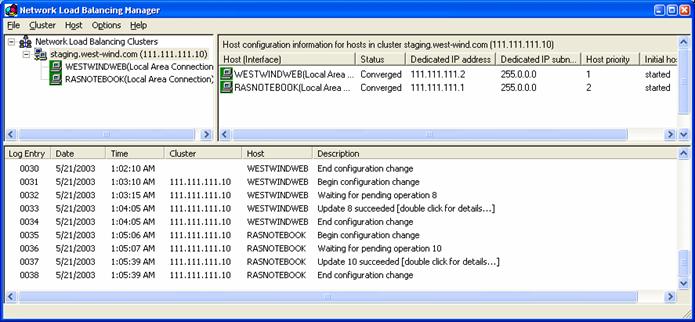
Figure 8 – The final cluster with both nodes converged and ready to process requests.Troubleshooting Tips
I’ve had a few problems getting convergence to happen for the first time. It helps to follow the steps here closely from start to finish and if for whatever reason you end up removing nodes make sure you double check your network settings first before re-adding nodes.
You can check what NLB did in the Network Connections for your machine (Figure 9). Click on the Load Balancing section to see the settings made there. Remember that the settings should match between machines with the exception of IP Addresses assigned for each machine. You should also see the new IP address added in the Internet Protocol settings’ Advanced page.
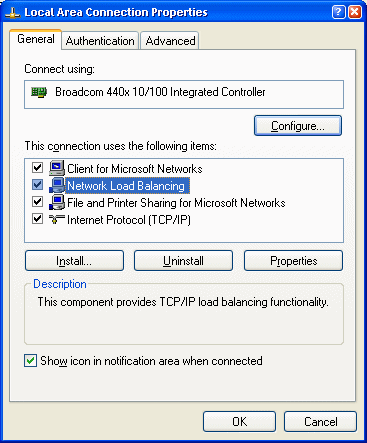
Figure 9 – All of the setting that NLB makes are made
to the network adapter that the virtual IP is bound to.
You can click on the Network Load Balancing item to
configure the node settings as described earlier. The Virtual
IP also has been added in the Internet Protocol | Advanced
dialog.If things look Ok, make sure that the machines can ping each other with their dedicated IPs. Figure 10 shows what you should see for one of the machines and you should run this test on both of them:
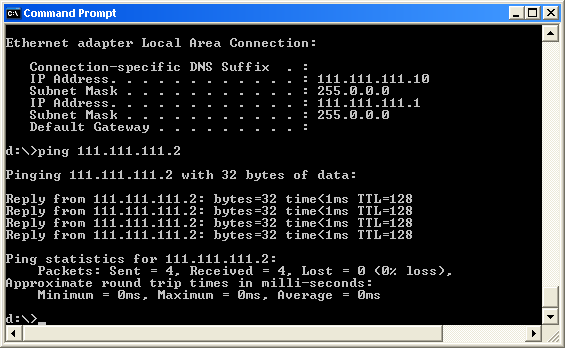
Figure 10 – Checking whether the machines can see each other.Use IPCONFIG to see adapter information and you should see both your physical adapter and the virtual IP configured. Make sure that you don’t get any errors that say that there’s a network IP address conflict. If you do it means that the virtual IP is not virtual – ie. It’s entered but it’s not bound to the NLB service. In that case remove the IP and then configure the NLB first, then re-add the IP address. Alternately remove everything then try adding it one more time through the NLB manager.
I’ve also found that it helps to configure remote machines first, then configure the machine running the NLB Manager (if you are using it in the cluster) last. This avoids network issues on the manager machine – plain network access gets a little weird once you have NLB configured on a machine. Again this is a great reason to use two adapters rather than one.
Putting it all togetherOk, so now we’re ready to try it out. For kicks I ran two simple tests using the Application Center Test tool that comes with VS.Net Enterprise Architects on my two machines: My office server (P4 2.2ghz) and my Dell Laptop (also P4 2.2ghz).
For the first test I used only a single ASP.Net page that reads some data from a local SQL Server using a business object. Both machines have SQL Server installed locally and for this first test both are using their own local data from it. I did this to test and see them run individually under load, and then together with Load Balancing to compare the results. This is a contrived example for sure, but it shows nicely what load balancing is capable of doing for you in a best case scenario. Figure 10 shows the output for a short query running both machines with Load Balancing
Allah Rasulü Hazret-i Muhammed (Sallallahu Aleyhi ve Sellem) buyurdular ki :
Her sarhoşluk veren şey (dinde yasaklanan içki olan) hamr grubundandır ve sarhoşluk veren her şey haramdır.Müslim, Eşribe 73Ocak 23, 2007: 11:06 am şuna cevap olarak: Exchange Server larınızın Üzerindeki İş Yükünü Paylaştırın (Network Load Balancing) #1424274emreaydin;231329 wrote:Merhaba,Bu makalenin burda yayinlanmasi icin kim nereden izin aldi. Gerekli bilgiyi verirseniz sevinirim!
Emre AYDIN
MSHowto.org – YöneticiMerhaba,
Bu makele yaklaşık benim bildigim 10-15 forumda var. zaten makalaler genellikle insanlar bilgilensin diye yazılır. bu yazdıgınız makaleden resim linkleriden dolayı kaldırılmasını istiyorsanız kaldırrız kendimiz ekleriz. alinti yazisini da simdi ekliyorum.Allah Rasulü Hazret-i Muhammed (Sallallahu Aleyhi ve Sellem) buyurdular ki :
Çorba pişirdiğin zaman suyunu çok koy. Sonra da komşularını gözden geçir ve gerekli gördüklerine güzel bir şekilde sun!Müslim, Birr 143Allah Rasulü Hazret-i Muhammed (Sallallahu Aleyhi ve Sellem) buyurdular ki :
Şurası muhakkak ki, Allah her nefsi yaratmış, onun hayatını, ölümünü, rızkını ve uğrayacağı musibetlerini yazmıştır.Tirmizi, 2144Allah Rasulü Hazret-i Muhammed (Sallallahu Aleyhi ve Sellem) buyurdular ki :
Benim hakkımda yalan söylemeyin. Zira benim üzerime yalan uyduran cehenneme girer.Buhari, İlm 38Allah Rasulü Hazret-i Muhammed (Sallallahu Aleyhi ve Sellem) buyurdular ki :
Eğer kişi namazını herkesin gözü önünde kılınca (edebine uygun kılar) güzel yapar, tek başına kimsenin görmediği durumda kılınca da (edebine uygun kılar) güzel yaparsa, Allah Teâla hazretleri (onun ibadetinden memnun kalır ve:) "Bu (kulluğunu riyasız yapan) gerçek bir kulumdur" der,KS, 7247Fishlabs Planet Riders *********Brain Challenge 1 & 2
 *********
Uyumlu Telefonlar:
Nokia 3230, 3250, 3600, 3620, 3650, 3660, 5500, 6260, 6600, 6620, 6630, 6670, 6680, 6681, 6682, 7610, 7650, E60, E61, E70, N70, N71, N72, N73, N80, N90, N91, N92, N93.
ALINTIDIIIR…
Bu mesaj en son " 14-01-2007 Sun " tarihinde saat 04:00 itibariyle Sarı_Bela tarafından düzenlenmiştir….


Sarı_BelaKullanıcının Profilini GösterSarı_Bela kullanıcısına özel mesaj gönderSarı_Bela tarafından gönderilmiş daha fazla mesaj bulSarı_Bela kullanıcısını arkadaş listeme ekleGiriş: Jan 2007Mesaj: 11

Rep. Puan: 14
Party Night Casanova *********Demae Itcho
 *********Uyumlu Telefonlar:Nokia 3230, 3250, 3600, 3620, 3650, 3660, 5500, 6260, 6600, 6620, 6630, 6670, 6680, 6681, 6682, 7610, 7650, E60, E61, E70, N70, N71, N72, N73, N80, N90, N91, N92, N93.
-
YazarYazılar


